
The system supported legal workflows tied to nearly 50% of organizational revenue, making errors or delays costly.
A $500K vendor implementation had been in progress for years without delivering a usable or trusted solution.
Legal workflows were complex, non-linear, and highly sensitive to accuracy, auditability, and compliance.
Stakeholders across legal, IT, leadership, and the vendor were misaligned on scope, requirements, and feasibility.
Continuing to invest in a misaligned solution risked further sunk cost, operational disruption, and loss of trust.
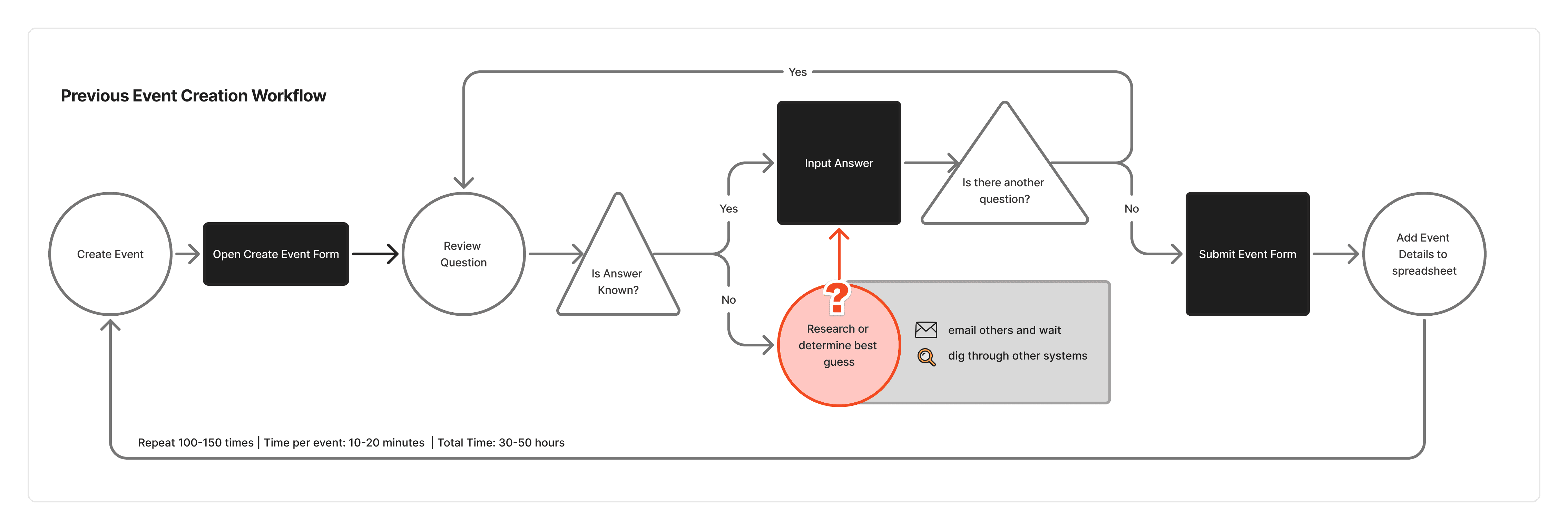
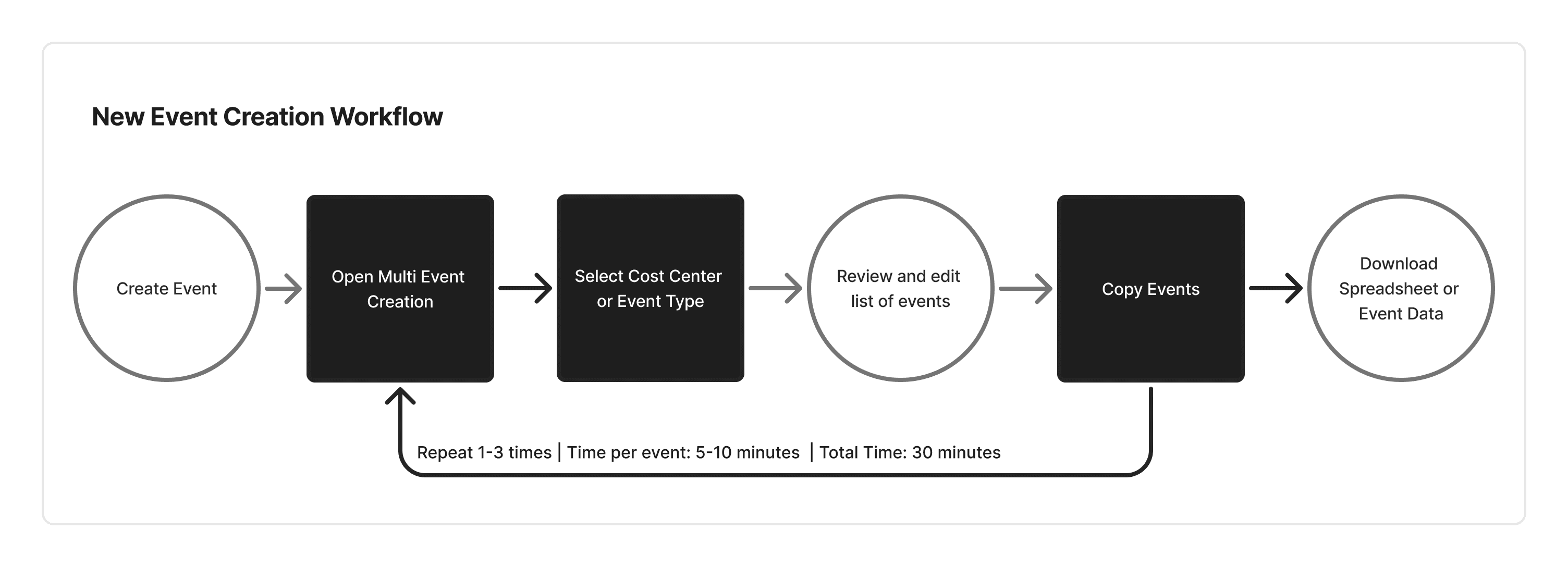
Before and after workflow diagrams
Previously, event admins had to track down or guess at missing information and create events one by one. The redesigned workflow allows repeatable event data to be copied from prior years and reviewed in a single, consolidated list organized by event type or cost center.
Research and key insights
I conducted research with 25+ users across 8 personas, representing different roles involved in event creation and execution.
Three insights shaped the direction of the redesign.
Required data did not match known data
Users were expected to enter information they simply did not have yet. This forced guesswork, placeholder values, or post-creation fixes.
Users thought in terms of event types and years, not individual forms
Most events recur annually. Users naturally organized and reviewed their work by cost center, event type, and year rather than as one-off records.
Accuracy mattered more than speed
While users wanted efficiency, they prioritized confidence and correctness, especially when errors could affect fundraising or reporting. This influenced how review and bulk actions needed to work.
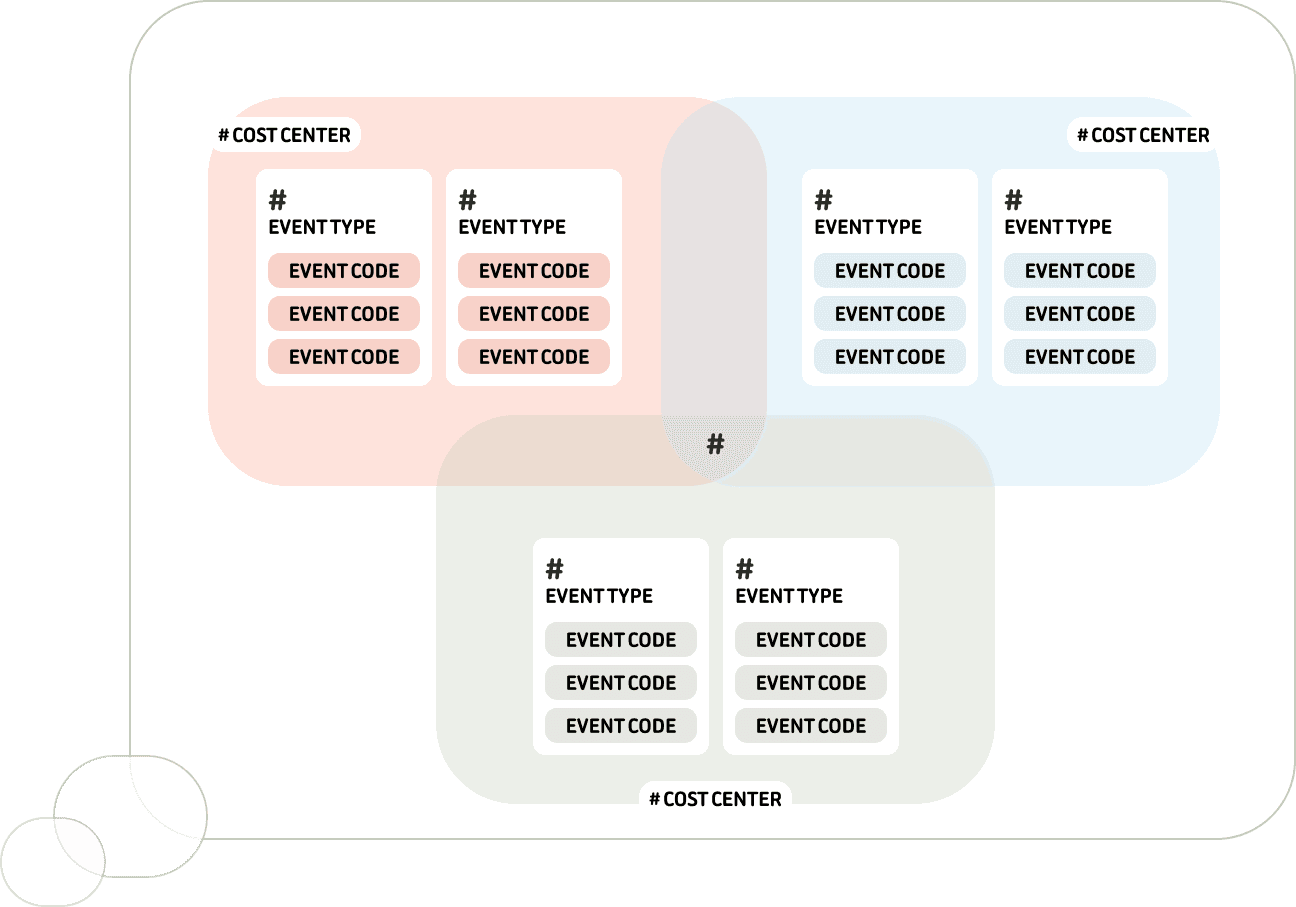
Admin mental model for event grouping
Admins organize work by event type and cost center, not as isolated records. This mental model shaped how multi-event review and copying needed to work.
Key Design Decisions
Rather than optimizing for a perfect “happy path,” I focused on designing for reality.
Reduced required fields at creation while protecting downstream workflows
Prioritized recoverability and transparency over raw speed
Designed list-based review experiences to match user mental models
Accepted intentional friction where accuracy and trust were more important than automation
DESIGNING FOR TIME, NOT JUST FORMS
One of the biggest opportunities was addressing how users managed recurring events over time.
Because many events repeat annually, I designed a workflow that allowed users to:
Generate a list of all events for a cost center
Review each event in a familiar list view to ensure accuracy
Make edits as needed
Copy entire sets of events forward with a single action
I also designed clear error handling and recovery paths so users could understand what succeeded, what failed, and why.
This approach respected users’ preference for review and control while eliminating hundreds of hours of manual work.
Step 1: Select Cost Center
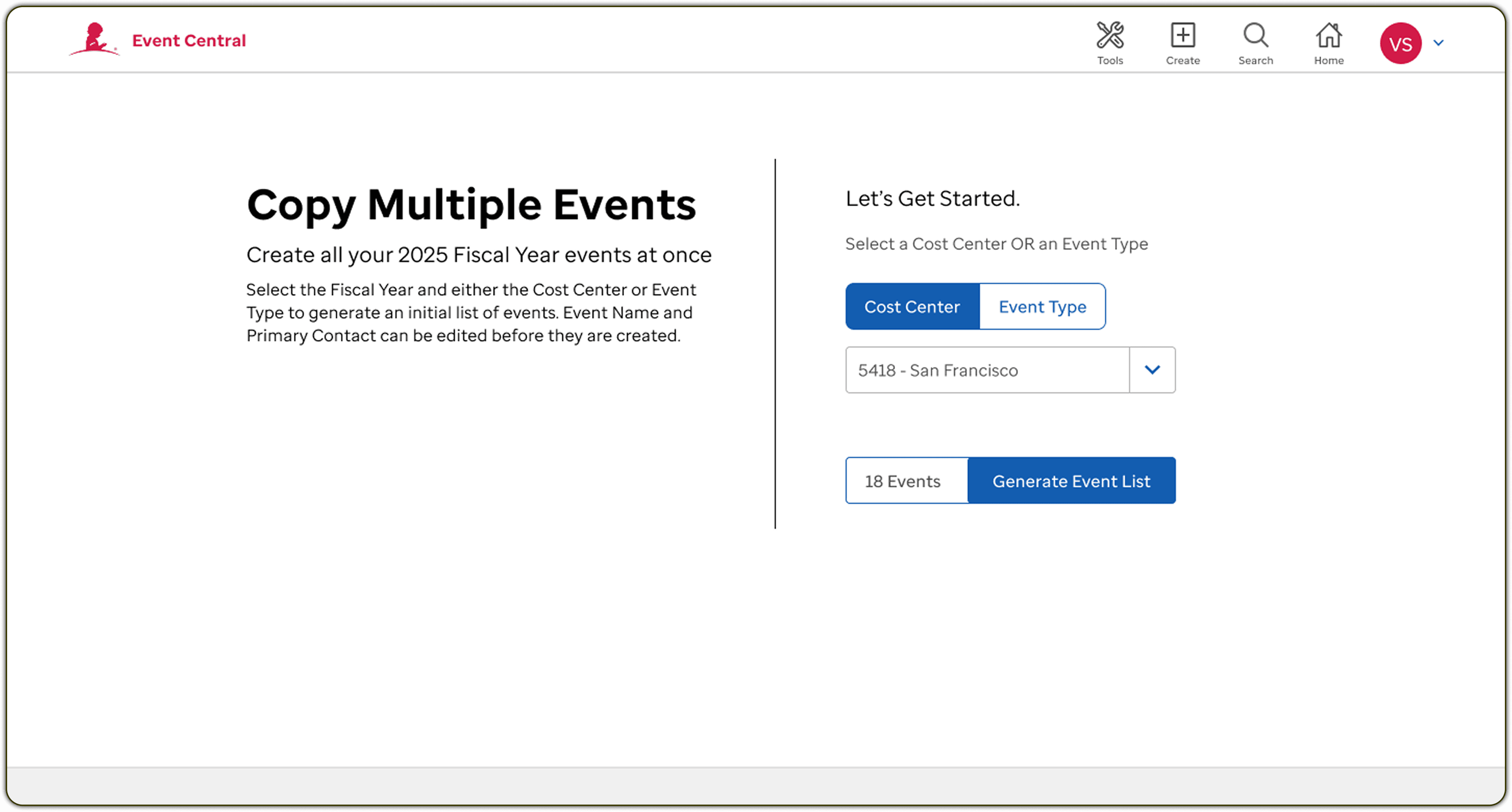
1 Select Cost Center or Event Type
While the primary method of work was cost center by cost center, there was a subset of users that would need to work by event type so both workflows were supported.
2 Display number of events
Admins are intensely aware of the number of events associated with each cost center and with each event type within their cost center. Having a count going into the next step gives them a heads up and prepares them for possible issues.
Step 2: Edit List of Events
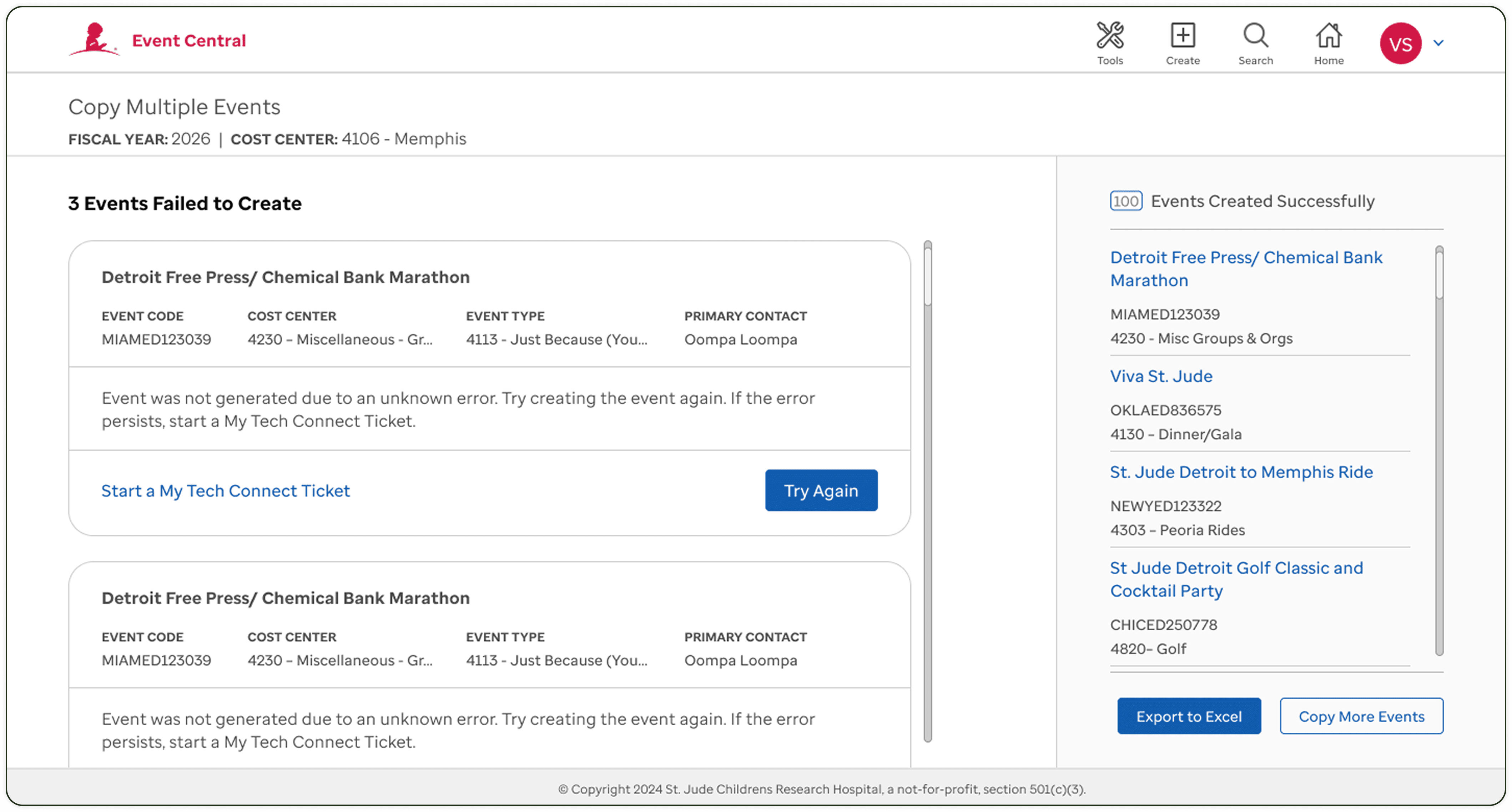
1 Checkboxes
Checkboxes not only allow admins to copy a subset of events, but it also serves as a method to keep track of where they are in the review process when frequently interrupted. They can jump right back in to where they were without losing stride.
2 Search & REMOVE
Since admins think in event counts, allowing them to search and remove events that are not moving forward helps them stay on track.
3 Filter by event type
Admins need to verify not just total events for their cost center, but also number of events per event type. They also create events by event type, I supported this mental model by allowing them to check their events in the same way.
+ No timeouts
Because admins can sometimes get called away for 30 minutes or an hour to resolve an issue, I was adamant that they could not get timed out from the system or else they would have to start over, losing all of the time spent and negating the benefits of the new system.
Step 3: Confirm Events are Created and Address any Errors
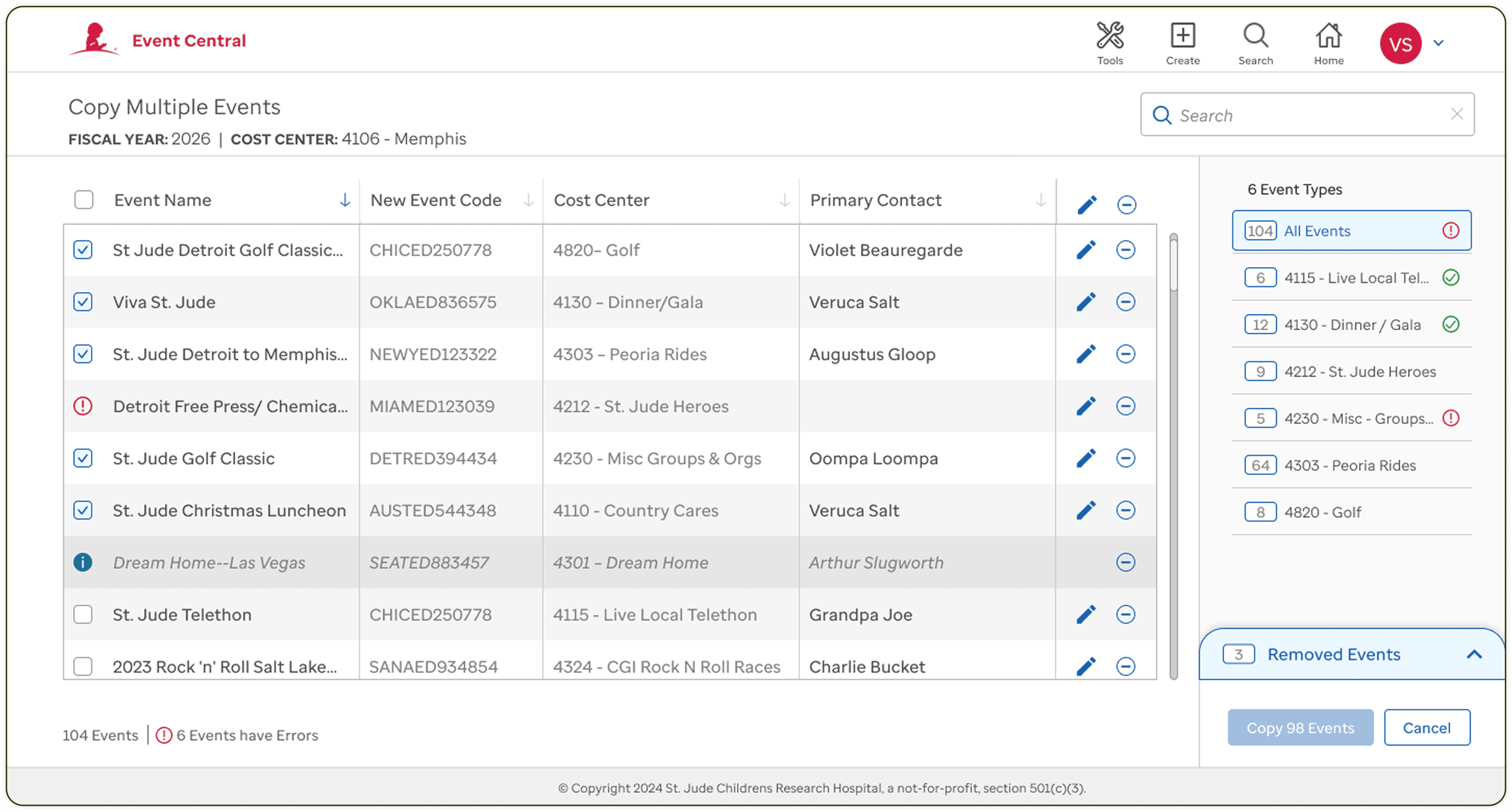
1 Get Help
With dev help, I determined the only likely error will be due to session timeout during the actual creation procedure. I provided a “Try Again” button to allow them to reprocess and resolve the issue.
In the event that it does not fix the issue, a button is available to easily submit a ticket and receive assistance.
2 View copied events
Admins can again verify that the total number of events that were created matches their expectation.
3 Export to Excel
Currently, Admins were creating spreadsheets manually of all of their events to share out with the event teams. We made this easy by creating their spreadsheets for them.
4 Keep moving forward
Since admins will often generate events for multiple cost centers back-to-back, we make it easy to start their loop over from the beginning.
SOLUTION OVERVIEW
The redesigned Event Central platform:
Aligned data entry requirements with what users actually knew at creation time
Centralized fragmented workflows into a single system of record
Reduced cognitive load by removing unnecessary fields and duplication
The system was designed to scale across teams, event types, and future releases.
Impact
Reduced event creation time from ~40 hours to under 30 minutes
Centralized workflows used by 40+ teams
Eliminated systemic data inconsistencies across downstream systems
Established a scalable foundation for future enhancements
Enterprise UX problems are rarely about screens. They are about systems, assumptions, and handoffs.
Designing for real workflows often means letting go of assumptions.
Trust, recoverability, and clarity are critical when errors carry real consequences.
Early alignment with engineering and stakeholders prevents expensive rework later.
Event Central reinforced my belief that good product design is about respecting reality. By designing for how work actually happens, rather than how we assume it happens, we created a system that users trust and rely on.